
Vintage Photo Lab
Vintage Photo Lab StudioPhotography
0.00.00 Reviews
- Version
- 1.0.12
- Installs
- 100.00K
- Age Rating
- Everyone
Screenshots
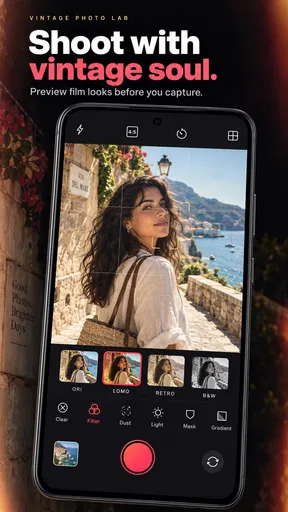
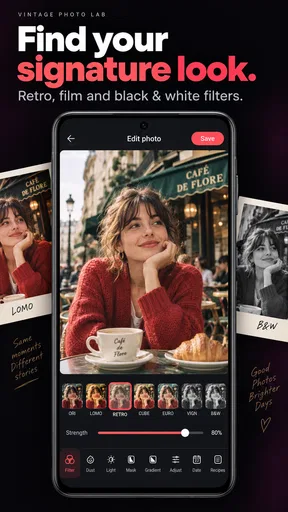
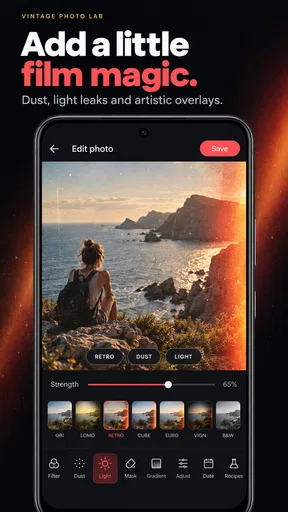
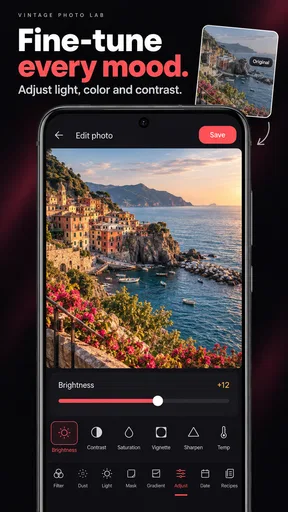
Our Review of Vintage Photo Lab
 Analysis by Appyee
I installed Vintage Photo Lab expecting a straightforward way to give ordinary phone photos a more nostalgic look, and that is exactly where this photography app makes the most sense. It is built around vintage color grading and artistic film filters rather than trying to replace a full camera or professional editing suite. I found it most appealing when I wanted a quick visual mood without spending several minutes adjusting every part of an image.
The app comes from Vintage Photo Lab Studio and is free to use. Its focus is easy to understand: take a photo, apply a visual treatment, and decide whether the result feels right for sharing or keeping. That narrow purpose is also its main strength. I did not approach it as an all-purpose editor, and I would not recommend doing so. It works better as a creative finishing tool for people who want their pictures to feel warmer, older, softer, or more deliberately stylized.
How it fits into a shared household phone
A realistic use case is a household phone that several people use for casual pictures. One person may photograph a birthday table, another may take a quick picture of a pet, and someone else may want to turn a plain snapshot into something suitable for a scrapbook or social post. In that situation, a focused filter app can be less intimidating than a large editor filled with sliders and technical controls.
I can imagine using it after a weekend walk when the original photos look clean but slightly lifeless. Rather than opening a more complicated editing application, I would choose a picture, test a few film-inspired appearances, and keep the version that best matches the memory. That workflow is especially comfortable for occasional users who do not want to learn exposure, curves, masking, or color correction before getting a pleasing result.
The household benefit is consistency. If several people are choosing images from the same day, using a similar visual treatment can make a small collection feel connected. A set of family meal photos, holiday snapshots, or pictures from a day trip may look more intentional when they share a warm or faded character. I would still avoid applying the same filter automatically to everything. Vintage effects can flatter an indoor portrait but make a landscape muddy, and a filter that suits a quiet scene may weaken a bright outdoor image.
This is also where I noticed an important trade-off. A filter can create atmosphere quickly, but it cannot rescue every poor photograph. If the subject is blurred, badly framed, or hidden in deep shadow, a nostalgic treatment may only make the problem more noticeable. I get better results by choosing a reasonably clear image first and treating the filter as a finishing decision, not as a repair tool.
A simple workflow for different people
For a child or less experienced phone user, the appeal is immediate visual feedback. They can explore the artistic side of photography without needing to understand technical terminology. For an adult organizing a family album, the value is speed: a few selected images can receive a coherent look without opening a desktop editor.
My preferred household workflow would be to keep the original image untouched, try a small number of styles, and compare the edited result with the source before deciding. This matters because vintage grading often changes skin tones and neutral colors. A photo may look charming at first glance while losing the natural color of clothing, food, or a room. Looking back at the original helps prevent the effect from becoming stronger than the memory itself.
Another useful habit is to choose the treatment according to the subject rather than the name or thumbnail of a filter. A soft, muted appearance may suit an old building or a quiet portrait, while a stronger artistic treatment may work better for a colorful street scene. The most attractive option in the selection is not automatically the most suitable one for the picture.
Setup boundaries and everyday handling
Vintage Photo Lab is an Android photography app with a minimum operating system requirement of Android 6.0. That makes it accessible to people using older compatible phones, although the experience will naturally depend on the device itself. On a shared phone, I would first make sure everyone understands where edited images are being saved and which version is the original. That simple conversation prevents accidental confusion later.
The app is free, which makes it easy to try without turning the decision into a financial commitment. Free access is useful in a household because different people can experiment before deciding whether the style is genuinely useful. I would still approach any free editor with ordinary care: review what appears on screen during setup, avoid granting access that does not seem relevant, and do not assume that every person using the device wants the same editing habits.
I also recommend setting a small boundary around shared photos. If one person edits another family member’s portrait, it is better to agree before changing or sharing it. A vintage effect can alter the way a face, complexion, or personal moment appears. The app is designed for creative editing, but creative freedom on a shared device should still include respect for the person in the picture.
Because this is a focused filter tool, I would not install it expecting the same control as a professional photo editor. If you need precise retouching, selective adjustments, detailed cropping, layers, or a carefully managed export process, a more advanced alternative is likely a better fit. The advantage here is not depth; it is the short path from an ordinary image to a recognizable visual style.
That distinction helps with storage and organization too. I would use it for a small selection rather than sending an entire camera roll through every available effect. Keeping a dedicated folder for edited favorites makes it easier for household members to find the finished images without mixing them with untouched originals. It also encourages more deliberate choices instead of creating many near-identical copies.
Who should control the final edit?
On a personal phone, the answer is simple: the photographer can decide. On a shared device, coordination becomes more important. If multiple people are taking pictures, I would agree on a basic routine: the person who captured the image keeps the original, while the person applying the effect saves a separate edited version. That arrangement is practical because it protects the source while still allowing experimentation.
For a family project, such as assembling pictures from a celebration, it can help to choose one person to make the final visual selections. This is not because the app requires a coordinator, but because a collection can become visually inconsistent when everyone applies a different style without discussing the purpose. One person might favor faded colors, another might prefer a dramatic film appearance, and the finished album may feel accidental rather than unified.
I would also avoid editing during a busy event if the phone is being passed around constantly. A quick filter preview is harmless, but organizing, renaming, or deleting images while people are still taking pictures increases the chance of mistakes. My better approach is to capture first, review later, and edit only the images that have a clear role in the final collection.
For social sharing, coordination matters even more. A person may like a heavily stylized image while another family member prefers a natural version. Keeping both versions available allows the photographer to choose appropriately for a private album, a message to relatives, or a public post. The app makes visual experimentation easy, but the decision about where an image goes should remain separate from the decision about how it looks.
Age, trust, and the right expectations
The app has an Everyone content rating, so its subject matter is suitable for a broad audience. That does not remove the need for normal guidance on a shared phone. Younger users may understand the filters quickly but may not think about consent, privacy, or the difference between an original and an edited copy. I would explain those points in plain language rather than treating the app as a problem.
For a younger family member, a good activity would be creating a small themed set from photos that the household has already agreed to use. This encourages visual judgment without turning someone else’s private picture into an experiment. It also gives adults a chance to show that editing is reversible only when the original has been preserved.
Trust is especially relevant with portraits. A vintage effect can make a face look older, paler, darker, or more dramatic depending on the color treatment. Even when the result is intended as a joke or artistic exercise, the person pictured should have a say before the image is shared. I see this as a household practice rather than an app feature: the tool offers the effect, while the people using it decide whether the effect is appropriate.
The same principle applies to photos of children, visitors, and private spaces. I would not let the convenience of a free filter app decide where a personal image travels. The best use is collaborative: choose the picture together, test the style, and agree before saving it as the version others will see.
There is also a useful learning opportunity here. Instead of telling a new user that one filter is “correct,” I would ask what the image is supposed to communicate. Is it meant to feel calm, playful, old-fashioned, dramatic, or intimate? That question leads to better choices than simply selecting the strongest effect. It also helps younger users understand that editing changes meaning, not just color.
When another photography app is better
I would choose Vintage Photo Lab when the main goal is a quick vintage appearance and the photo is already reasonably good. I would choose a standard phone editor when I only need basic brightness, cropping, or rotation. Those tools are usually faster for corrections that do not require a special look.
I would choose a full-featured editor when the image needs careful repair or when I want control over individual areas. For example, a group portrait with one face in shadow may need selective work rather than a global film treatment. Likewise, a product photo, document image, or important print may need accurate color more than artistic character. In those cases, the app’s creative focus may become a limitation.
I would also skip it for anyone who wants a complete camera workflow, advanced organization, or professional color management. The app belongs in the expressive end of photography, not the technical end. That is not a criticism by itself; it simply means the right audience is someone who values a distinctive mood over exhaustive control.
For casual users, the comparison is more favorable. A regular editor may offer more options but create decision fatigue. Here, the appeal is that the visual direction is already clear. If I am preparing a handful of images for a personal memory board, I would rather make a few meaningful choices than spend a long time adjusting settings that may produce only a subtle difference.
What I would expect from the current release
The app is currently at version 1.0.12, and it was released on February 4, 2026. I mention the release stage because it shapes my expectations: I see this as a relatively focused tool whose value should be judged by how smoothly it handles its central purpose, not by whether it matches mature professional editors feature for feature.
In practical use, that means I would test the basic path first. Can everyone in the household understand how to select a photo, preview a style, and keep the preferred result without confusion? If that process feels comfortable, the app has done the important job for its intended audience. If someone needs extensive correction tools or a complex library, the app may feel too narrow even if its filters are attractive.
I would also pay attention to how a chosen effect behaves across different subjects. A filter that looks excellent on a warm outdoor scene may be less convincing on a white wall, a food photo, or a person under artificial lighting. My tip is to create a small personal shortlist of styles for recurring situations rather than assuming one favorite will work everywhere.
Another non-obvious use is visual storytelling. Instead of applying an effect to every image, I would use a stronger vintage treatment for a few transition pictures and a gentler look for the main moments. This creates contrast and keeps the most important faces and details readable. The app is more useful when the filter supports the story instead of becoming the story.
For shared-device coordination, I would label the purpose mentally before editing: album, message, keepsake, or playful experiment. An album may benefit from consistency, a message may call for a lighter touch, and a playful experiment can tolerate something more extreme. That small distinction prevents the common mistake of using the same treatment for every destination.
My household verdict
After using it as a focused photography tool, I see Vintage Photo Lab as a good choice for households that want an easy creative option without committing to a complicated editor. It is free, suitable for Everyone, and available for Android phones running Android 6.0 or later. The developer, Vintage Photo Lab Studio, has kept the central idea clear: give everyday photos a vintage or artistic visual identity with minimal effort.
I would recommend it to a friend who enjoys nostalgic imagery, edits occasional snapshots, or wants a simple activity that several people can understand. It is particularly useful for small personal projects, themed photo collections, and quick transformations after a family outing. The strongest results come when the original is preserved, the effect is chosen for the subject, and everyone agrees before a shared portrait is distributed.
I would not recommend it as the only photo app for someone who needs detailed correction, professional precision, or a complete image-management system. Its narrow scope is both the reason it is approachable and the reason advanced users may outgrow it. A normal phone editor or a more powerful alternative will be better when accuracy and control matter more than atmosphere.
My final advice is to treat the filters as a creative accent rather than a shortcut to better photography. Start with a clear image, compare the edited version with the original, and use stronger effects selectively. In a shared household, add one more step: ask whose picture it is and where it will be used. With those boundaries in place, Vintage Photo Lab becomes an enjoyable, low-pressure way to give selected memories a distinct visual character.
Verdict
Strengths of Vintage Photo Lab
- Easy-to-use tools for creating retro photo effects
- Wide range of vintage filters and analog-style textures
- Supports quick editing directly from your phone
- Useful for creating nostalgic social media posts
- Offers creative overlays for adding character to images
Limitations of Vintage Photo Lab
- Some effects may look overly artificial on certain photos
- Advanced editing controls are limited
- Free version may include ads or restricted features
- High-resolution exports may depend on the selected option
- Results can vary noticeably between different image types
Similar Picks in This Category
View All
Google Photos
Google LLC4.4

Gallery
Google LLC4.2

Picsart AI Photo Editor, Video
PicsArt, Inc.3.9

B612 AI Photo&Video Editor
SNOW Corporation4.1

BeautyPlus-Selfie Photo Editor
PIXOCIAL TECHNOLOGY (SINGAPORE) PTE. LTD.4.5

Remini - AI Photo Enhancer
Bending Spoons4.1
Frequently Asked Questions
What is Vintage Photo Lab used for?
Vintage Photo Lab is a photo-editing app designed to give modern pictures an old-fashioned appearance. During testing, its main appeal was the collection of retro filters, film-inspired color effects, light leaks, grain, dust, frames, and other nostalgic overlays. It is suitable for creating vintage-style portraits, travel photos, social media posts, and casual creative edits without requiring advanced photography skills.
Is Vintage Photo Lab free to download and use?
The app can generally be downloaded at no initial cost, but availability of editing tools may depend on the version installed and the platform’s current monetization model. Some filters, effects, frames, or export options may be restricted behind in-app purchases, subscriptions, or advertisements. Before downloading, users should check the Google Play Store or App Store listing for the latest pricing and premium-access details.
Does Vintage Photo Lab work without an internet connection?
Many basic editing functions can usually be used offline once the application and its included resources are installed. However, an internet connection may be required for downloading additional effects, loading advertisements, restoring purchases, synchronizing content, or accessing certain online features. If offline editing is important to you, it is worth testing the essential filters and saving options before relying on the app while traveling.
Can edited photos be saved and shared in high quality?
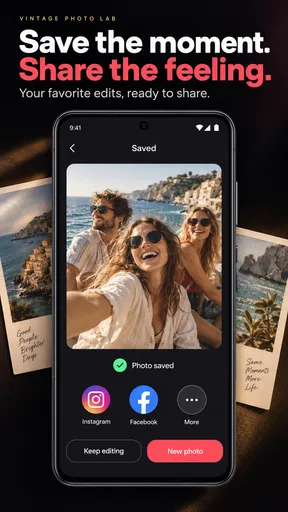
Vintage Photo Lab normally allows users to save completed edits to the device and share them through compatible social networks, messaging apps, or other installed services. The final image quality can vary according to the original photo, selected export settings, and whether a particular resolution option is limited to premium users. Check the export preview carefully, especially when preparing images for printing or professional use.
Is Vintage Photo Lab suitable for beginners?
Yes, the app is primarily aimed at casual users and beginners who want quick visual results rather than complex manual retouching. Its filter-based workflow makes it easy to import a photo, choose a vintage style, adjust the intensity, and add decorative effects. More experienced editors may find the controls less comprehensive than those in professional apps, but the straightforward interface is convenient for fast creative edits.
